
Is Excel hard to learn? No. The basics of Excel are easy and most people pick them up in a few hours. What feels hard is the middle: formulas that use $ references, lookups that return #N/A, messy data and reports that have to be right every month. With a clear order of topics and real practice files, a beginner can reach confident everyday use in about 4-6 weeks of regular practice and job-ready analysis skills in 2-3 months.
I have used Excel in business reporting for more than 20 years and have taught it on YouTube since 2017. The same question comes up again and again from students, accountants, HR staff and job seekers in India, the US and the Gulf: “Am I too late, and is it too difficult?” This post gives you an honest answer, level by level, so you know exactly which part is easy, which part takes effort and what to learn next.
The short answer: Excel is easy to start and takes practice to master
Excel is not one skill. It is a ladder of five levels. The first step is low, and each step after it builds on the one before. People who say “Excel is hard” usually tried to jump from Level 1 straight to Level 4 (a dashboard or a pivot report for their boss) without the formulas in between.
Save this cheat sheet. It is the whole ladder on one page.
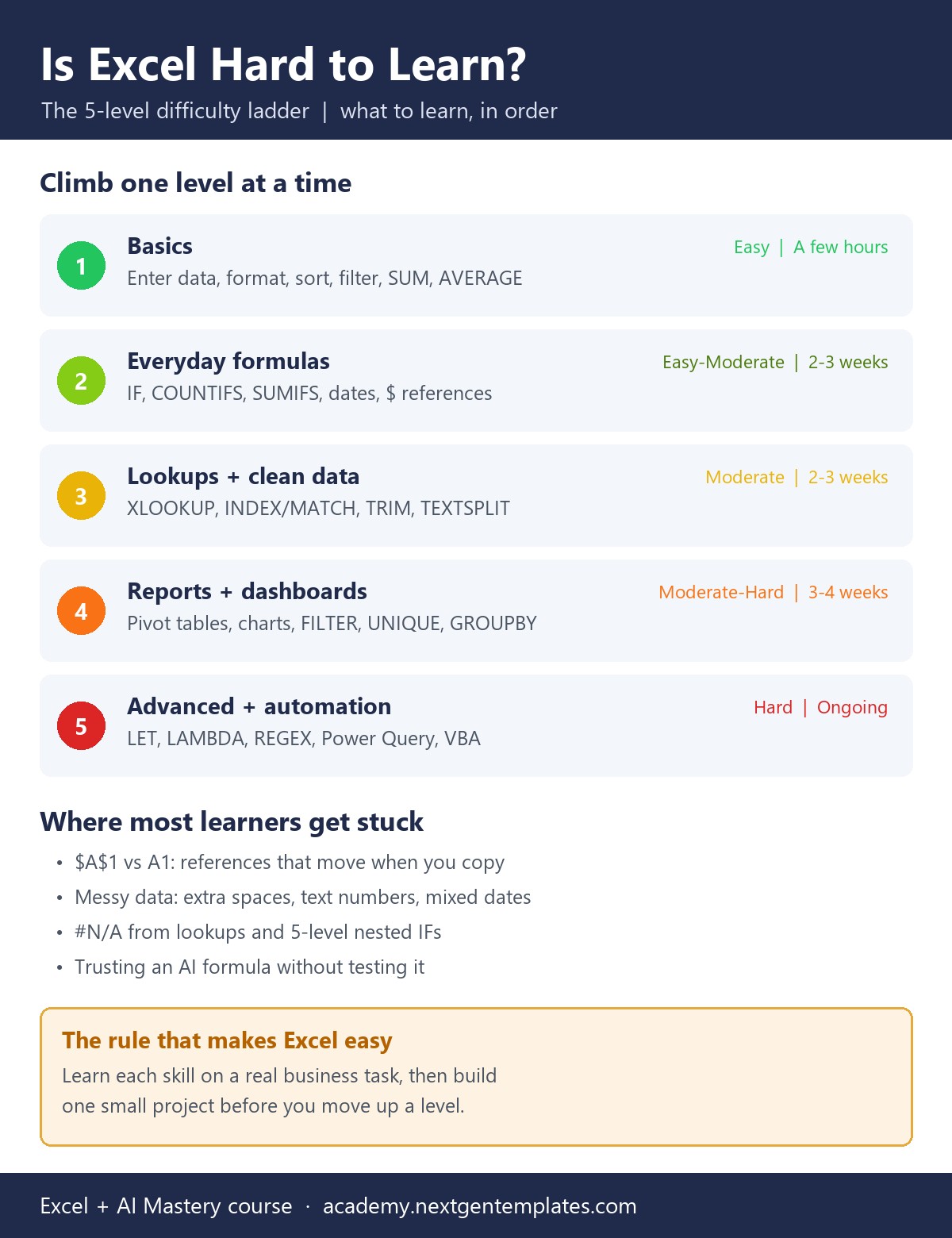
How hard is each level of Excel?
The time estimates below assume about 30-45 minutes of practice a day on real tasks, not just watching videos. Your own speed will depend on how often you use Excel at work.
| Level | What you learn | Difficulty | Typical time | Where it is taught |
|---|---|---|---|---|
| 1. Basics | Entering data, formatting, sort, filter, SUM, AVERAGE | Easy | A few hours | Free course: Excel Essentials in 2 Hours |
| 2. Everyday formulas | IF, COUNTIFS, SUMIFS, dates, relative and absolute ($) references | Easy to moderate | 2-3 weeks | Excel + AI Mastery, Modules 1 and 3 |
| 3. Lookups and clean data | XLOOKUP, INDEX/MATCH, text cleanup, reconciling records | Moderate | 2-3 weeks | Excel + AI Mastery, Modules 2 and 5 |
| 4. Reports and dashboards | Pivot tables, charts, FILTER, UNIQUE, GROUPBY, KPI dashboards | Moderate to hard | 3-4 weeks | Excel + AI Mastery, Modules 6 and 9; Pivot Tables & Dashboards course |
| 5. Advanced and automation | LET, LAMBDA, REGEX, Power Query, VBA macros | Hard | Ongoing | Excel + AI Mastery, Module 7; Excel VBA Basics with AI |
Level 1: Basics (easy)
Typing data, formatting a table, sorting, filtering and adding a total with SUM. If you can use a phone app, you can do this. Most people need a few hours. The goal here is comfort, not speed.
Level 2: Everyday formulas (easy to moderate)
This is where most office work lives: IF to apply a rule, COUNTIFS and SUMIFS to total by region or month, date functions for due dates and ages. The one concept that trips almost everyone is the $ sign. A1 moves when you copy a formula, $A$1 does not. Once that clicks, Excel suddenly feels much easier.
Level 3: Lookups and clean data (moderate)
Real data is messy: extra spaces, numbers stored as text, names typed three different ways. Lookups such as XLOOKUP and INDEX/MATCH fail on messy data, and that is why people see #N/A and decide Excel is hard. The fix is to learn cleaning and lookups together, which is exactly how Module 2 of my course is built.
Level 4: Reports and dashboards (moderate to hard)
Pivot tables, charts and dynamic arrays such as FILTER, UNIQUE and GROUPBY let you build a monthly report that updates by itself. This level is not hard because of any single feature. It is hard because you must combine Levels 2 and 3 correctly. Learn it on one complete project, not on random examples.
Level 5: Advanced and automation (hard, and optional for most jobs)
LET, LAMBDA, REGEX, Power Query and VBA. Very useful, but most office roles never need all of it. Learn these when a real task asks for them, not on day one.
Why Excel feels hard (and the fix for each)
- Learning functions without a task. Memorising 100 functions does not stick. Fix: learn each function on a business problem, such as an invoice, an attendance sheet or a sales scorecard.
- Skipping references. Wrong $ signs give wrong totals that look right. Fix: practise copying formulas across and down until you can predict the result.
- Practising on clean, perfect data. Then real exports break everything. Fix: practise on messy files on purpose.
- Jumping to dashboards too early. Fix: climb the ladder in order. A dashboard is just Level 2 and Level 3 formulas plus good layout.
- Trusting AI formulas blindly. Copilot and ChatGPT write formulas fast, but they are sometimes wrong. Fix: check every AI answer with a small test grid of cases you already know the answer to.
Does AI make Excel easier to learn in 2026?
Yes for writing formulas, no for understanding them. An AI assistant can draft a SUMIFS or an XLOOKUP in seconds, and it can explain a long formula you inherited from a colleague. But if you cannot read the formula, you cannot tell when it is wrong, and a wrong number in a report is worse than no number.
That is why my Excel + AI Mastery course treats AI as a helper you verify, not a shortcut you trust. Module 1 has a lesson called Ask Copilot to explain a formula, then verify it yourself, and Module 8 (Excel + AI Workflows) covers a prompt-to-formula workflow with a test grid and using AI on inherited workbooks and messy data. No paid AI subscription is needed for the course; the AI steps are optional and every result is checked by hand.
Quick self-test: which level are you at?
Answer yes or no. Your level is the first question where you answer “no”.
- Can you sort and filter a table and add a total row? (Level 1)
- Can you total sales by region and month with SUMIFS, and copy the formula without breaking it? (Level 2)
- Can you match two lists with XLOOKUP and fix the #N/A rows caused by extra spaces? (Level 3)
- Can you build a monthly report with a pivot table or FILTER/GROUPBY that updates when new data is added? (Level 4)
- Can you write a reusable LAMBDA or a short macro to automate a repeat task? (Level 5)
For a more detailed check, try the free Test Your Skills page on the Academy.
The easiest way to learn Excel step by step
- Start free. If you are a complete beginner, take the free Excel Essentials in 2 Hours course first.
- Learn formulas in the right order. Foundations, then text cleanup and lookups, then analysis. My guide on which Excel formulas to learn first lists the order.
- Practise every day for a short time. 30-45 minutes on a real file beats a 5-hour weekend binge. My 30-day Excel roadmap gives you a day-by-day plan.
- Build one project per level. An invoice for lookups, a scorecard for formulas, a KPI dashboard for reporting.
- Use AI to explain, then verify. Ask it why a formula works, then test it on cases you know.
Two free tutorials on PK: An Excel Expert are good next steps: the XLOOKUP formula tutorial for Level 3 and the free step-by-step Excel course for extra practice on the basics.
NextGenTemplates Academy course
Excel + AI Mastery: 100 Essential Formulas and Real-World Projects
Levels 2 to 5 of this ladder, in order: 10 modules · 75 lessons · 58 video lessons (11h 47m) · 65 downloadable practice workbooks · an assessment and quiz in every module · real business projects (invoice generator, receivables aging, payroll, KPI dashboard with formulas only) · a final capstone business control workbook · certificate of completion · lifetime access.
Price: ₹2,499 in India (regular ₹3,999) · $59 internationally (regular $79). One-time payment, no subscription. You need basic Excel navigation; Microsoft 365 Excel for Windows is recommended.
Planning a career move with Excel? Read my guide to Excel skills for your resume or browse the Academy learning paths.
Frequently asked questions
Is Excel hard to learn for beginners?
No. The basics, such as entering data, formatting, sorting, filtering and SUM, take only a few hours. Formulas, lookups and reports take a few weeks of regular practice, which is normal and very manageable if you learn them in order.
How long does it take to learn Excel?
Most beginners reach confident everyday use in about 4 to 6 weeks of 30 to 45 minutes of daily practice, and job-ready analysis skills such as lookups, pivot tables and dashboards in about 2 to 3 months.
What is the hardest part of Excel to learn?
For most people it is the middle levels: relative and absolute references, lookups that return #N/A on messy data, and combining formulas into a report. Advanced topics such as LAMBDA, Power Query and VBA are harder but optional for many jobs.
Can I learn Excel on my own?
Yes. Many people learn Excel on their own with a structured course, practice files and one small project per level. A clear order of topics matters more than talent.
Does AI make learning Excel easier?
AI tools such as Copilot and ChatGPT make writing formulas faster, but you still need to understand formulas to check the answer. Use AI to explain and draft, then verify every result with a small test grid.
Excel is not hard. It is a ladder. Take one step at a time, practise on real work, and you will be surprised how quickly the difficult parts become easy. All the best!
Priyendra Kumar (PK), founder of NextGenTemplates and creator of PK: An Excel Expert