Project Management in Excel: Plan, Schedule, Track & Report
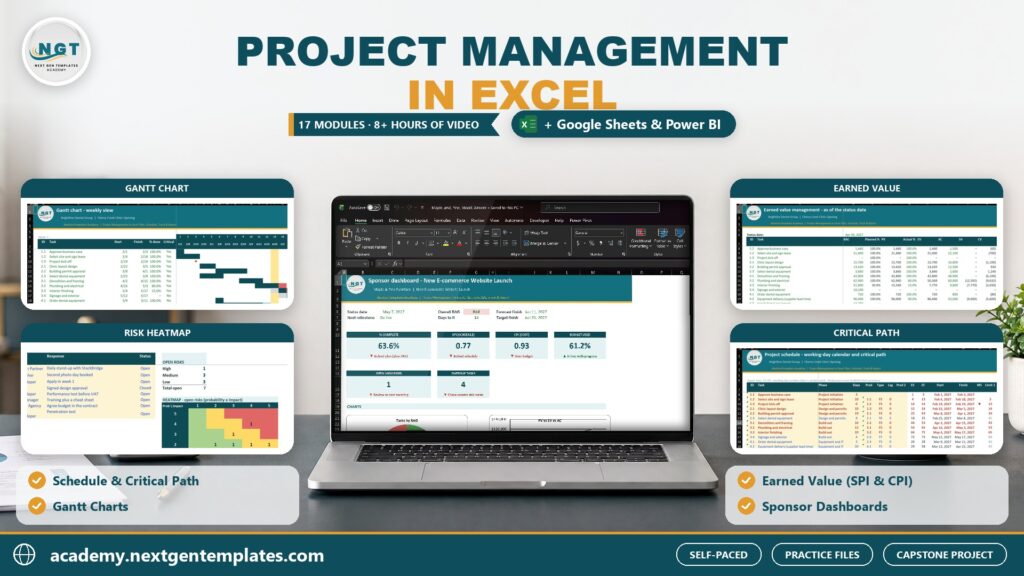
Run one real project from charter to final report in Excel: WBS, critical path schedule, Gantt charts, resources and RACI, budget and S-curve, earned value (SPI, CPI, EAC), RAID log, Agile boards and sponsor dashboards, plus Google Sheets and Power BI add-ons.
 Created by Priyendra Kumar (PK) · NextGenTemplates Academy
What you’ll learn
- Set up a project workbook with a charter, stakeholder register and a WBS that numbers itself
- Schedule tasks with FS, SS and FF dependencies, milestones, float and the critical path in Excel
- Build Gantt charts: conditional-formatting, scrolling daily, stacked-bar and baseline vs actual
- Plan resources with an allocation heatmap, capacity vs demand and a RACI matrix with checks
- Estimate costs bottom-up, build a time-phased budget and an S-curve, and track budget vs actual
- Measure performance with earned value: PV, EV, AC, SPI, CPI, EAC, VAC and TCPI
- Keep a RAID log with a risk heatmap, issue and decision logs and change requests
- Run Agile work in Excel with a backlog, sprint capacity, a Kanban board and burndown charts
- Build a one-page sponsor dashboard and a multi-project portfolio view
- Automate the weekly status report with Power Query, a macro and AI
A practical route to better work.
A hands-on project management course in Excel. You plan, schedule, track and report one real project from the first charter to the final sponsor dashboard: the opening of a new dental clinic for Brightline Dental Group, a fictional Denver business, with a $450,000 budget and a June 30 deadline. Start with the basics every project needs: the lifecycle and the triple constraint, Waterfall, Agile and hybrid ways of working, and a clean workbook layout. Learn the Excel skills project managers use every day: Tables and dropdowns, working-day date functions with holiday lists, XLOOKUP and SUMIFS, dynamic arrays, formula-based conditional formatting and protected inputs. Write the project charter and stakeholder register, then build a WBS that numbers itself. Schedule the work with finish-to-start, start-to-start and finish-to-finish dependencies, milestones, float and the critical path, and draw it as a conditional-formatting Gantt, a scrolling daily Gantt, a stacked-bar chart Gantt and a baseline vs actual Gantt. Plan resources with an allocation heatmap, capacity vs demand and a RACI matrix with checks. Estimate the cost bottom-up, spread it into a time-phased budget and S-curve, then track progress, slippage and timesheet hours with an auto-filled weekly status report. Measure performance with earned value management: PV, EV, AC, SPI, CPI, three EAC methods, VAC and TCPI, and turn the numbers into a clear message for the sponsor. Keep the RAID log: a scored risk register, a 5x5 heatmap, issue, assumption and decision logs and a change request log with its impact on the baseline. Run the Agile side with a backlog, sprint capacity, a Kanban board and burndown charts. Present it all on a one-page sponsor dashboard with KPI cards, charts, pivot tables, slicers and a multi-project portfolio view, and automate the Friday report with Power Query, a one-click macro and an AI-drafted status email. Add-on modules take the tracker to Google Sheets and Power BI, and a capstone project for a second business, Maple & Pine Furniture, lets you build a full project workbook on your own. Every lesson comes with a practice file and a solution file, and every workbook opens on a lesson guide with self-checks, so you always know your numbers are right. No MS Project or paid PM tool needed.
Inside the course
17 modules · 88 lessonsMODULE 01Module 0: Welcome+
MODULE 02Module 1: PM Basics for Excel Users+
MODULE 03Module 2: Excel Skills for Project Managers+
MODULE 04Module 3: Charter, Scope and WBS+
MODULE 05Module 4: Scheduling and Critical Path+
MODULE 06Module 5: Gantt Charts in Excel+
MODULE 07Module 6: Resource Planning and RACI+
MODULE 08Module 7: Cost, Budget and S-Curve+
MODULE 09Module 8: Tracking and Status Reporting+
MODULE 10Module 9: Earned Value Management+
MODULE 11Module 10: RAID Log+
MODULE 12Module 11: Agile and Kanban in Excel+
MODULE 13Module 12: Project and Portfolio Dashboards+
MODULE 14Module 13: Automate Status Reporting+
MODULE 15Module 14: Google Sheets Edition+
MODULE 16Module 15: Power BI PMO Dashboard+
MODULE 17Module 16: Capstone Project+
Practice files
19 downloadable practice workbooks to follow along with the lessons.
Video lessons
72 step-by-step video lessons (9h 32m), streamed securely.
A knowledge check
Test your understanding with clear feedback and explanations.
Certificate of completion
Complete the course to download a certificate of completion with a unique certificate ID.
Is this course for you?
- Project coordinators and project managers in small and mid-sized companies
- PMO analysts, engineers, site planners and team leads who run projects in spreadsheets
- PMP and CAPM aspirants who want hands-on practice with schedules and earned value
- Excel users who want working project tools instead of PM theory
Before you start
- Microsoft Excel 365 or Excel 2021 for Windows (most lessons also work on Mac)
- Basic Excel: entering data and simple formulas such as SUM
- No project management background needed; every method is explained from scratch
- A free Google account for the Google Sheets module and Power BI Desktop (free, Windows) for the Power BI module
About your instructor
Priyendra Kumar (PK)
Founder, NextGenTemplates · Creator of PK: An Excel Expert
A business intelligence consultant, educator and template creator with more than 20 years of real-world experience in Excel, Power BI, Google Sheets, dashboards and business reporting.
PK has shared Excel tutorials on YouTube since 2017. In this course he teaches the same practical way: understand the idea, work through a business example, and build something you can use.
More about PKGood to know
How do I buy a course, and which payment methods can I use?+
Choose a course, select Add to cart and complete checkout. With an Indian billing address you pay in INR through Razorpay, using UPI, cards or net banking. From any other country you pay in USD through PayPal, including debit and credit cards. It is a one-time payment, and the course appears in My Learning as soon as payment is confirmed.
Can I learn at my own pace?+
Yes. Lessons are organized into modules, and signed-in learners can save their progress and resume where they left off.
Are practice files included?+
Yes. Practice files are included with each paid course and can be downloaded from the course once you are enrolled. They are for your personal learning and your own internal work.
Will I receive a certificate?+
Yes. When you complete all required lessons (and any knowledge check or assignment in the course), you can download a certificate of completion with a unique certificate ID. It confirms course completion; it is not an academic or professional accreditation.
How long will I have course access?+
You get lifetime access: you can use the course for as long as NextGenTemplates Academy operates and offers it, as described in the Course Access Policy. There is no subscription or renewal fee.
Can I get a refund?+
Courses are digital content with immediate access, so purchases are generally non-refundable. Limited exceptions are explained in the Refund Policy.
FREE EXCEL LESSONS BY EMAIL
Not ready to enroll yet?
Join the Academy email list for practical Excel and AI tips, free preview lessons and news when a new course opens. Unsubscribe at any time.