
Financial Modeling in Excel: From Zero to 3-Statement, DCF & Dashboards
Build a complete financial model in Excel step by step: revenue forecast, costs, debt and tax, a linked three-statement model, DCF valuation, scenarios, budget vs actual, a Power BI finance dashboard and a Google Sheets edition.
 Created by Priyendra Kumar (PK) · NextGenTemplates Academy
What you’ll learn
- Lay out a financial model the way analysts do, with clear inputs, calculations and outputs
- Use the Excel skills modelers need: absolute references, named ranges, SUMIFS, XLOOKUP, INDEX-MATCH and scenario switches
- Read and explain the income statement, balance sheet and cash flow statement and how they link
- Forecast revenue from drivers, plus costs, working capital, capex and depreciation
- Model a term loan, interest, tax with losses carried forward, equity and dividends
- Link the three statements so the balance sheet balances, and handle circular references safely
- Audit a model with error checks and find the cause when it does not balance
- Value a business with a DCF: free cash flow, WACC, terminal value and equity value
- Run scenarios, sensitivity tables, goal seek and budget vs actual variance analysis
- Present the results in a Power BI finance dashboard and a shared Google Sheets model
A practical route to better work.
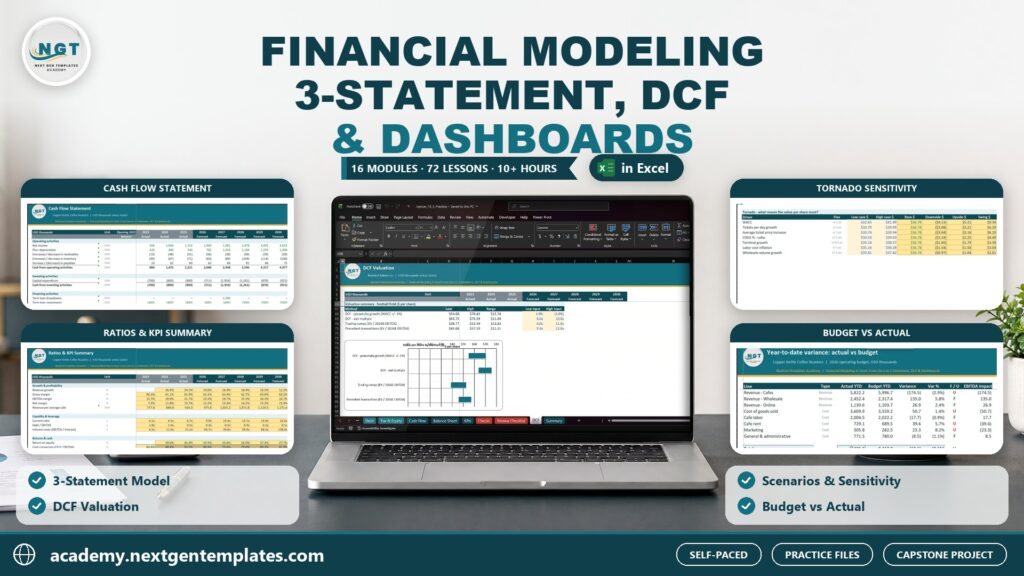
A hands-on financial modeling course in 16 modules and 72 lessons. You build one real model from an empty workbook to a finished, checked forecast for Copper Kettle Coffee Roasters, a fictional US coffee business with cafes, wholesale roasting and online subscriptions. Start with the basics: what a financial model is, how to lay it out into inputs, calculations and outputs, and the formatting standards analysts use. Learn the Excel skills modelers rely on every day, including absolute references, named ranges, SUMIFS, XLOOKUP, INDEX-MATCH, date timelines, scenario switches and shortcuts. Read the income statement, balance sheet and cash flow statement, then forecast them: revenue drivers, seasonality and channel mix, cost of goods sold, fixed and variable operating expenses, working capital days, capex and depreciation. Add the term loan, interest, tax with losses carried forward, equity and dividends, and link all three statements until the balance sheet balances, including interest on cash and circular references handled safely. Audit the model with error checks, then value the business with a discounted cash flow: free cash flow, WACC, terminal value and enterprise to equity value. Test it with scenarios, data tables, goal seek and a tornado chart, and use it for budgeting, rolling forecasts and budget vs actual variance reports. Take the numbers into a Power BI finance dashboard with a date table, DAX for YTD and variance, a P&L matrix and cash flow visuals, and move the model to Google Sheets with a shared assumptions panel and range protection. Finish with a capstone model for a second business, Bluebird Bakery Co., and a bonus module on comparable company analysis and a simple LBO. Every lesson comes with a practice file and a solution file, and every workbook opens on a lesson guide with live self-checks so you always know your numbers are right.
Inside the course
16 modules · 72 lessonsMODULE 01Welcome+
MODULE 02Financial Modeling Basics+
MODULE 03Excel Skills for Modelers+
MODULE 04Reading Financial Statements+
MODULE 05Assumptions and Revenue Forecast+
MODULE 06Costs, Working Capital and Capex+
MODULE 07Debt, Tax and Equity+
MODULE 08Linking the Three Statements+
MODULE 09Model Audit and Error Checks+
MODULE 10DCF Valuation+
MODULE 11Scenarios and Sensitivity+
MODULE 12Budgeting, Forecasting and Variance+
MODULE 13Power BI Finance Dashboard+
MODULE 14Google Sheets Edition+
MODULE 15Capstone Project+
MODULE 16Bonus: Comps and LBO+
Practice files
18 downloadable practice workbooks to follow along with the lessons.
Video lessons
72 step-by-step video lessons (10h 27m), streamed securely.
Certificate of completion
Complete the course to download a certificate of completion with a unique certificate ID.
Is this course for you?
- Finance, accounting and FP&A staff who want to build forecasts and budgets with confidence
- Small-business owners who need a three-statement forecast and a valuation for their own company
- Students and job seekers preparing for finance, analyst and FP&A roles
- Excel users who want to move from spreadsheets to real, linked financial models
Before you start
- Microsoft Excel 365 or Excel 2021 on Windows or Mac
- Basic Excel: entering data and simple formulas such as SUM
- No finance or accounting background needed; every statement is explained from scratch
- Power BI Desktop (free, Windows) for Module 12 and a free Google account for Module 13
About your instructor
Priyendra Kumar (PK)
Founder, NextGenTemplates · Creator of PK: An Excel Expert
A business intelligence consultant, educator and template creator with more than 20 years of real-world experience in Excel, Power BI, Google Sheets, dashboards and business reporting.
PK has shared Excel tutorials on YouTube since 2017. In this course he teaches the same practical way: understand the idea, work through a business example, and build something you can use.
More about PKGood to know
How do I buy a course, and which payment methods can I use?+
Choose a course, select Add to cart and complete checkout. With an Indian billing address you pay in INR through Razorpay, using UPI, cards or net banking. From any other country you pay in USD through PayPal, including debit and credit cards. It is a one-time payment, and the course appears in My Learning as soon as payment is confirmed.
Can I learn at my own pace?+
Yes. Lessons are organized into modules, and signed-in learners can save their progress and resume where they left off.
Are practice files included?+
Yes. Practice files are included with each paid course and can be downloaded from the course once you are enrolled. They are for your personal learning and your own internal work.
Will I receive a certificate?+
Yes. When you complete all required lessons (and any knowledge check or assignment in the course), you can download a certificate of completion with a unique certificate ID. It confirms course completion; it is not an academic or professional accreditation.
How long will I have course access?+
You get lifetime access: you can use the course for as long as NextGenTemplates Academy operates and offers it, as described in the Course Access Policy. There is no subscription or renewal fee.
Can I get a refund?+
Courses are digital content with immediate access, so purchases are generally non-refundable. Limited exceptions are explained in the Refund Policy.
FREE EXCEL LESSONS BY EMAIL
Not ready to enroll yet?
Join the Academy email list for practical Excel and AI tips, free preview lessons and news when a new course opens. Unsubscribe at any time.